Folx - Downloader for Mac

Free Internet Download Manager
and your favourite Torrent client

Related Products
Case Studies

Client: Daniel Tomson

"Folx helps me when download files from internet, especially from mediafire.It even makes me to download easily with just less click, automaticaly. Thanks for this software."

read full review
Build Info
File size:
9.2Mb
Latest build:
1.0.591.456
Release date:
9th March, 2010
Build compiled:
9th March, 2010
User Manual Changelog (RSS)
Downloader Mac

Download files quickly and easily

Folx is the best download assistant for Mac.

Folx is a free download manager for Mac OS X. Its friendly interface will help you take the most of your downloads. It's not overloaded with tons of unnecessary features and is extremely easy to use. All you have to do to download files is click the link in your web browser and Folx will catch it.

By the way, Folx is a 2-in-1 app: you don't need one program for common downloads and other one to download torrents. Folx can handle both as a piece of cake.

mac downloader os x

With Folx Downloader you can:

Download with Folx instead of your web browser:

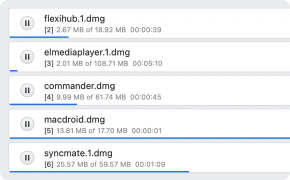
Folx can split your downloads in multiple threads, thus it is much faster. You also have an option to adjust the download and upload speed in Folx and prioritize the most important downloads by just dragging them to the top of the queue. Folx also offers auto-resuming of your downloads in case you went offline or the tracker was down, etc.

free downloader program for mac

Forget about the mess by tagging your downloads:

The more you download the harder it is sometimes to find the needed files in your downloads folder. By tagging your downloads you instruct Folx to save them to folders that correspond with assigned tags using symlinks. Whenever you need to find your downloaded content, you even don't have to launch Folx, just look in your main downloads folder and follow the familiar tags structure. Assign as many tags to each download as you wish!

Mac downloader

Download even faster

With PRO version of Folx you can split downloads in up to ten threads, which helps significantly increase the download speed.

torrent Mac

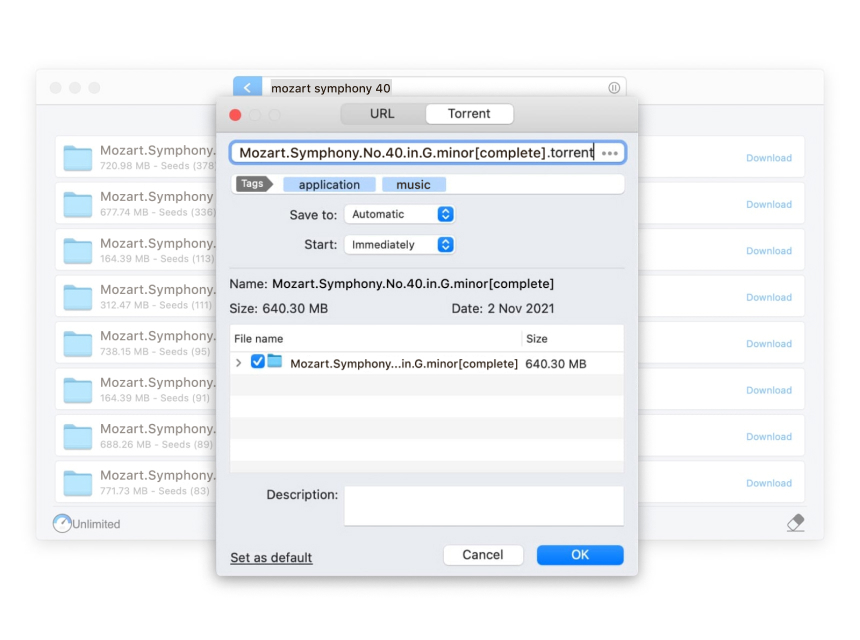
Search for torrents directly from Folx:

If you use Folx PRO you don't have to browse through multiple torrent trackers searching for particular file. Folx has wide list of torrent trackers' URLs inside and once you enter the keywords in Folx it will search through all of them and provide you with convenient list of results.

free internet download manager

Schedule the download tasks

In Folx PRO you can schedule the downloads and define Folx exiting behavior when downloading is finished: whether system will shut down, switch to sleeping mode or Folx will just quit.

idm for Mac

Control speed in a smart way

In PRO version you get access to "Smart Speed Adjustment", which limits the download and upload speed AUTOMATICALLY whenever you begin using Internet more intensively.

Full features list:

  • Powerful download engine for maximum performance
  • High download speed
  • Auto-resuming file transfer
  • Set the priorities for downloads
  • Control time and speed of your downloads
  • Smart Speed Adjustment (PRO Version)
  • Split the downloads in several threads
  • Scheduling of downloads (PRO)
  • Torrent client
  • Search for torrents directly from the application (PRO Version)
  • Detailed log info to check the download process
  • Automatic capture of download links
  • Broadband support
  • Smart tag and folder technology to manage all your downloads
  • Growl integration
  • Spotlight integration
  • Almost all Mac OS X browsers integration
  • A wise Floating Window – quick access to your downloads
  • User-friendly interface

Interface languages:

English

Compatible with:

  • Mac OS X 10.4
  • Mac OS X 10.5
  • Mac OS X 10.6
#
Comparison option
Folx
Folx PRO
1 Search for torrents directly from the application No Yes
2 Smart Speed Adjustment No Yes
3 Scheduling of downloads No Yes
4 Split the downloads in up to ten threads No Yes
5 Split the downloads in two threads Yes Yes
6 Easy to use Torrent client Yes Yes
7 Control time and speed of your downloads Yes Yes
8 High download speed Yes Yes
9 Detailed log info to check the download process Yes Yes
10 Auto-resuming file transfer Yes Yes
11 Set the priorities for downloads Yes Yes
12 Automatic capture of download links Yes Yes
13 Smart tag and folder technology to manage downloads Yes Yes
14 Growl integration Yes Yes
15 Spotlight integration Yes Yes
16 All popular Mac OS browsers integration Yes Yes
17 Handy Status window – quick access to downloads Yes Yes